from pile_driving import run_analysis, pile_plotBasic pile-driving app
TME 310 A, Project Part 2
Purpose
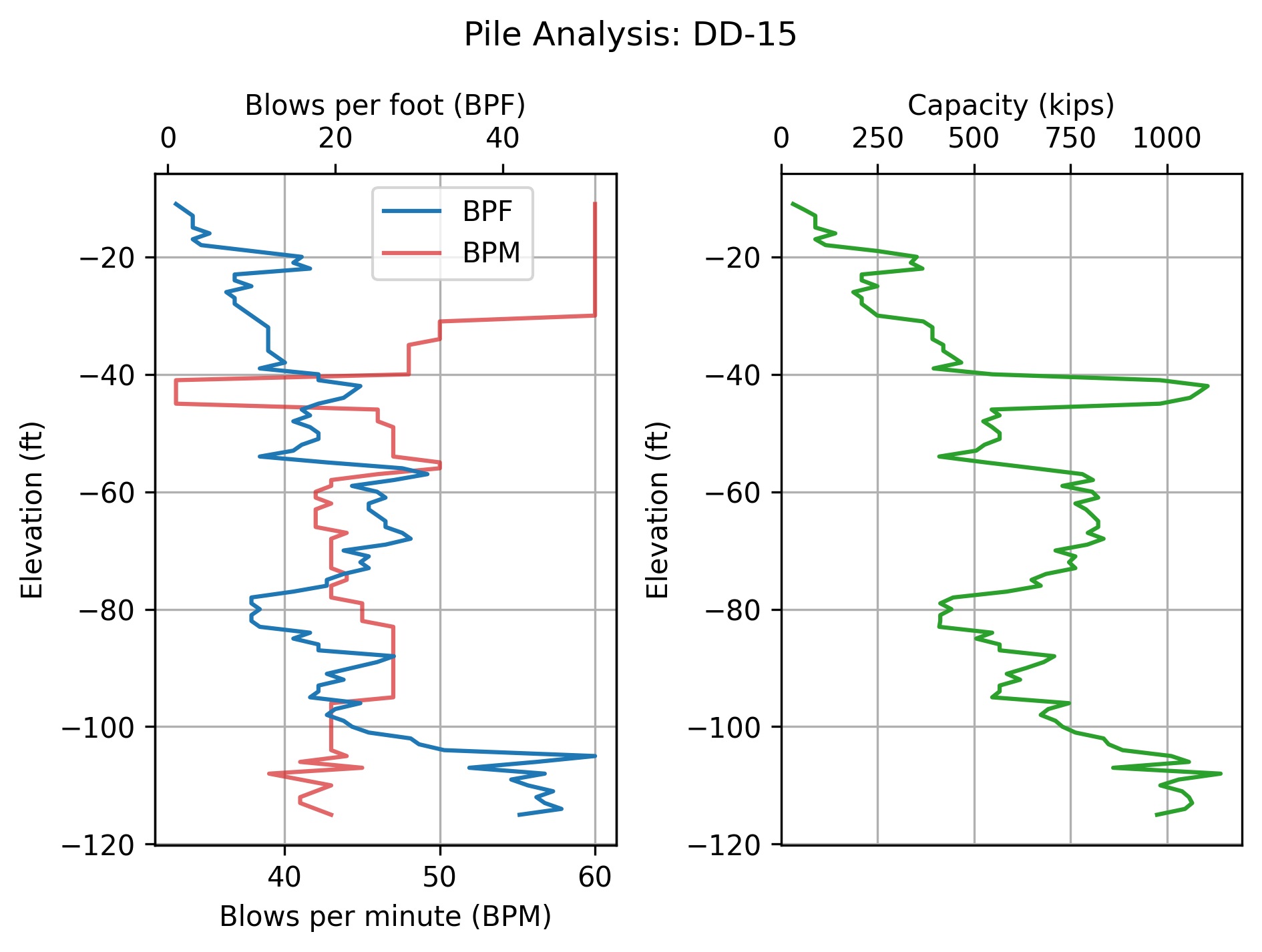
This app analyzes pile-driving log data to estimate pile load capacity and visualize driving performance. The app reads a pile-driving log file, calculates the pile’s ultimate capacity using the \(S_o\) equation, and presents the results as plots and a text summary.
Instructions
How to use this app
Import the analysis functions: Run the first code cell to import the required functions from the
pile_driving.pymodule.Configure analysis parameters (optional): In the second code cell, you can modify the
configdictionary to change the hammer and pile parameters used in the capacity calculations. The default values are appropriate for typical pile installations, but you may adjust them if needed for your specific project.Select a pile-driving log file: In the third code cell, change the
log_filevariable to the name of the pile-driving log file you want to analyze. The file should be located in the same directory as this notebook.Run the analysis: Execute the code cell to analyze the selected pile. The app will:
- Display a text summary showing the pile ID, final tip elevation, and estimated load capacity
- Generate plots showing:
- Blows per minute (BPM) and blows per foot (BPF) vs. elevation
- Estimated pile capacity vs. elevation
Adding new pile logs
To analyze additional piles, place properly formatted pile-driving log CSV files in the same directory as this notebook. The log files should follow the format of the provided sample files.
Setup
Import functions from pile_driving module
Configure analysis parameters
Modify these values if needed for your specific pile and hammer setup. Default values are shown.
config = {
    "hammer_weight": 20_000,  # Hammer weight in pounds
    "hammer_efficiency": 0.4,  # Hammer efficiency (dimensionless, 0-1)
    "pile_length": 150,  # Pile length in feet
    "pile_area": 477,  # Pile cross-sectional area in square inches
    "modulus": 6_000_000,  # Modulus of elasticity in psi
}
Analysis
Select pile log file and run analysis
# Select the pile-driving log file to analyze
log_file = "sample_pile_log_01.csv"  # Change this to analyze a different pile

# Run the analysis and display results
pile_id, elevation, bpm, bpf, q = run_analysis(log_file, **config, summary=True)
pile_plot(pile_id, elevation, bpm, bpf, q)
Pile installation summary
----------------------------------------
Pile ID:              DD-15
Final tip elevation:   -115.0   feet
Pile capacity:          974     kips
----------------------------------------